
Microsoft are very keen that all users of Windows 11 activate OneDrive on their PCs, tablets and laptops.
However, using OneDrive with Power Music can cause issues unless you follow the instructions below.
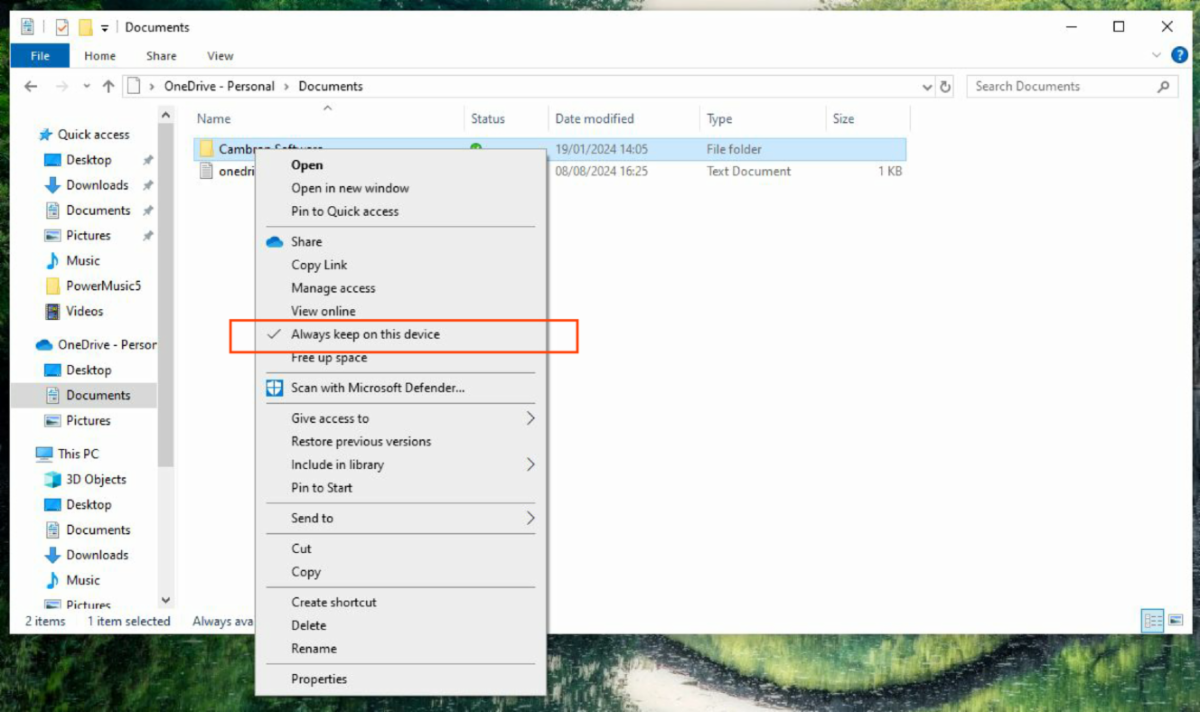
If you are using OneDrive please make sure the "Always keep on this device" option is selected for the Cambron Software folder in Documents. Right click on the Cambron Software folder and select this option from the pop-up menu. That should stop any issues arising.
We have had a number of support requests from users, where the synchronisation and storage location of songs on OneDrive causes issues. If you are not already using OneDrive, we would recommend that users do not use OneDrive on devices running Power Music.

Getting your head round the way OneDrive stores your files can be confusing. I found the "Ask Leo" YouTube channel has some good videos on understanding OneDrive.
Comments
0 comments
Article is closed for comments.